Best AI Architectural Rendering Software in 2026
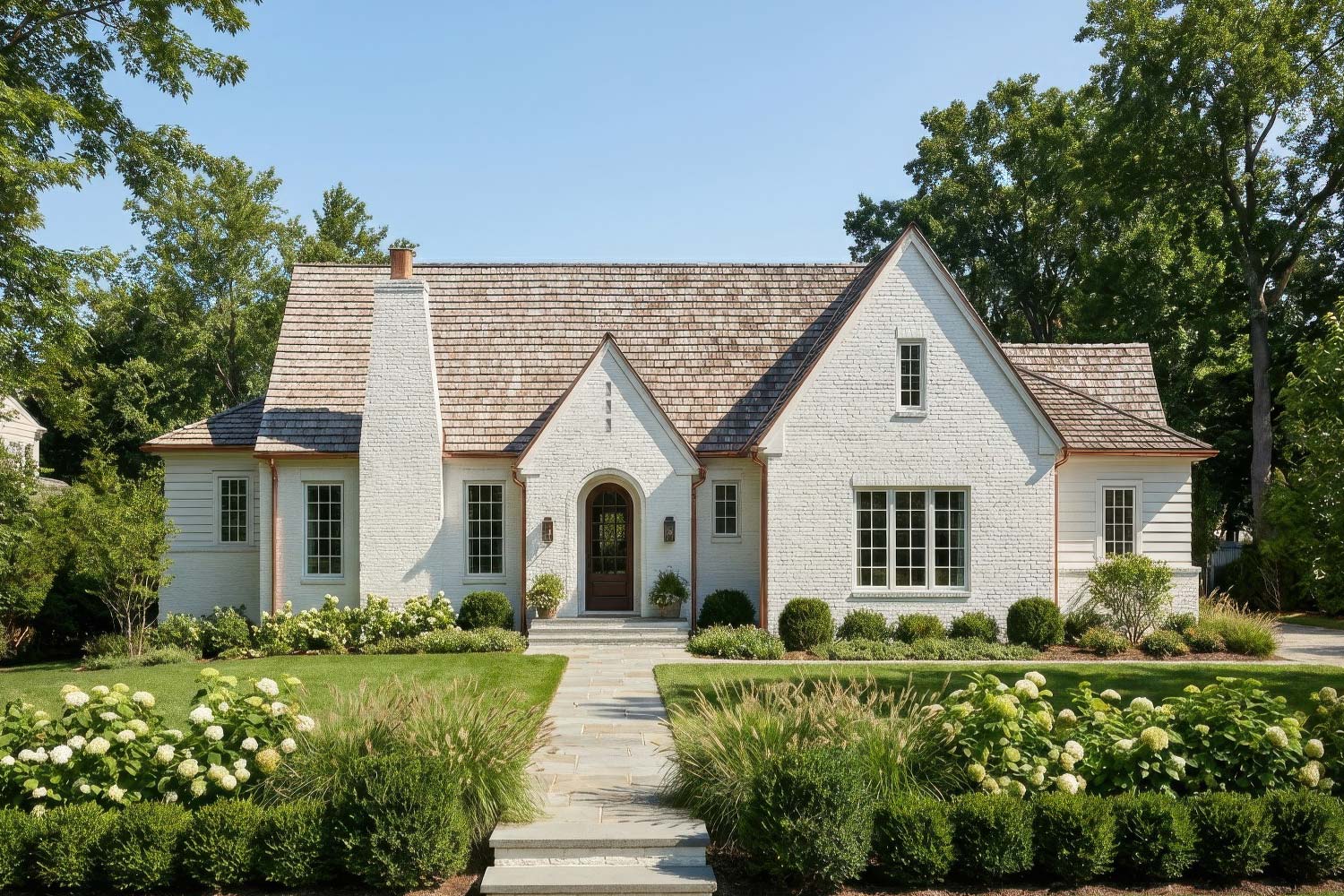
Architectural rendering used to mean one thing: wait. Wait for the lighting setup. Wait for the render farm. Wait overnight for a single image that might need revisions anyway.
That's changed. AI-powered rendering tools now produce photorealistic visuals in seconds — not hours — without requiring specialized hardware or deep technical expertise. For architects and designers who need to move fast, communicate ideas clearly, and iterate with clients in real time, these tools have become essential.
This guide compares the leading AI rendering platforms available in 2026. We're focusing specifically on AI-native tools — not traditional renderers like V-Ray or Lumion, which still have their place but solve a different problem. If you're looking to speed up your visualization workflow without sacrificing quality, this is where to start.
What to Look for in AI Rendering Software
Before diving into specific tools, it's worth understanding what separates good AI rendering software from mediocre options. Not all tools are created equal, and the right choice depends on how you actually work.
3D model support matters. Some AI tools only work with 2D images — you upload a sketch or photo, and the AI generates a styled version. That's useful for early concepts, but it can't maintain consistent geometry across multiple views. If you're working from a 3D model in SketchUp, Revit, or Rhino, you want a tool that can import that geometry and render from any angle while preserving your actual design.
Workflow integration is underrated. The fastest render in the world doesn't help if you're constantly exporting, uploading, downloading, and re-organizing files. Look for tools that support project-based organization, version history, and — if you work with others — team collaboration.
Pricing models vary wildly. Some tools charge per render (which can get expensive fast), while others offer predictable monthly subscriptions. Know your volume before committing.
Style control determines usefulness. Can you guide the output with prompts? Upload mood boards? Adjust lighting and environment? The more control you have, the more useful the tool becomes for client-facing work.
The Best AI Architectural Rendering Tools in 2026
1. ArchRender — Best for Architects Working from 3D Models
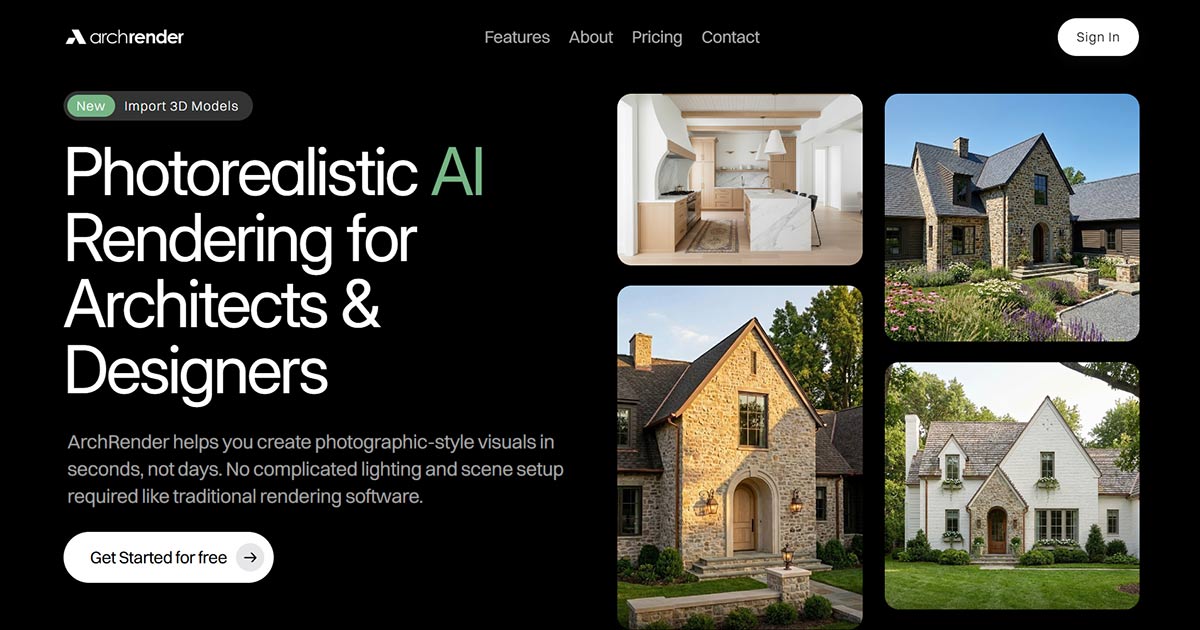
ArchRender is built specifically for architects and designers who work in 3D. Unlike most AI rendering tools that only process 2D images, ArchRender lets you import actual 3D model files (OBJ, FBX, GLB formats), position your camera freely, and generate photorealistic renders from any angle — all while preserving your actual geometry.
This is a fundamental difference. Most "AI rendering" tools are really image-to-image processors: you upload a screenshot of your model, and the AI stylizes that single view. If you want a different angle, you go back to your modeling software, export another screenshot, and start over. While ArchRender also supports that kind of workflow, its standout feature is true 3D import, you upload once and render unlimited angles from within the platform.
What makes it different:
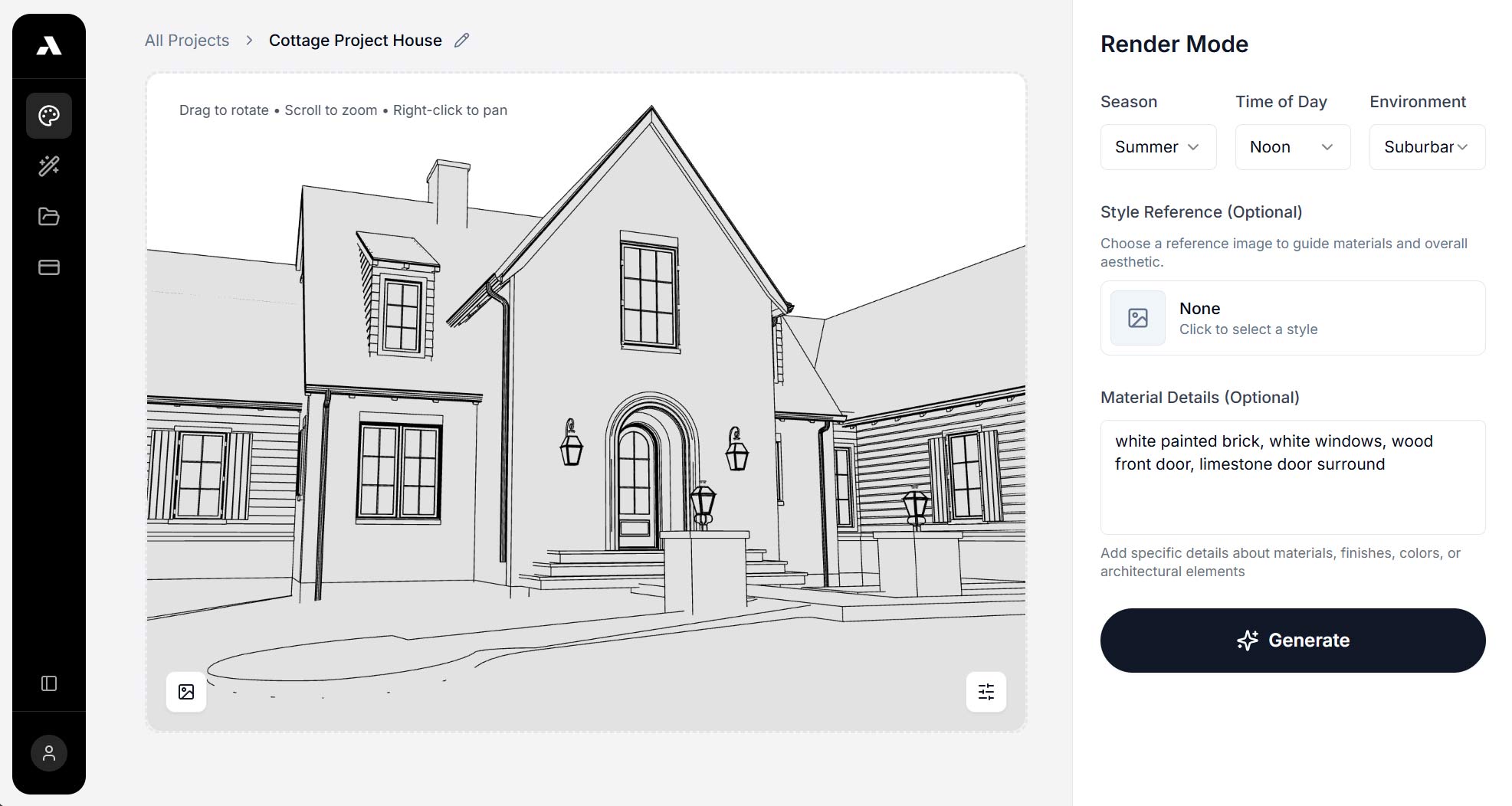
The core workflow starts with your 3D model file — not an image of it. Once imported, you get full camera controls: adjust the angle, set field of view, choose your aspect ratio. This means you can render multiple views of the same design without re-uploading or losing consistency. The AI handles lighting, materials, and environment automatically — no manual setup required.
ArchRender also supports sketch and image input for earlier-stage work, but the 3D model pipeline is where it shines for production use.
Standout features:
Mood board input — Drop in an inspiration image and the AI interprets the colors, finishes, and style, then applies them to your render. This is faster than writing detailed prompts and produces more consistent results when matching a specific aesthetic.
Environment controls — Built-in settings for season (spring, summer, fall, winter), time of day, and surrounding context. Clients often want to see how a building looks in different conditions; this makes those variations trivial to produce. This is a must for exterior renders.
Project-based organization — All renders and source files stay together in projects. You can return weeks later, pick up where you left off, and maintain version history across iterations. This matters for real architectural work where projects evolve over months.
Team account sharing — Multiple team members can access the same projects, prompts, and render history. For studios where work passes between designers, this eliminates the friction of separate logins and duplicated files.
4K upscaling — Any render can be upscaled to 4K for presentations, proposals, or print materials.
Pricing:
ArchRender uses monthly subscriptions with clear, predictable pricing:
Basic: $29/month (150 credits, 5 projects)
Pro: $49/month (300 credits, 20 projects)
Studio: $119/month (1000 credits, unlimited projects)
All plans include 3D model import and 4K upscaling.
Limitations:
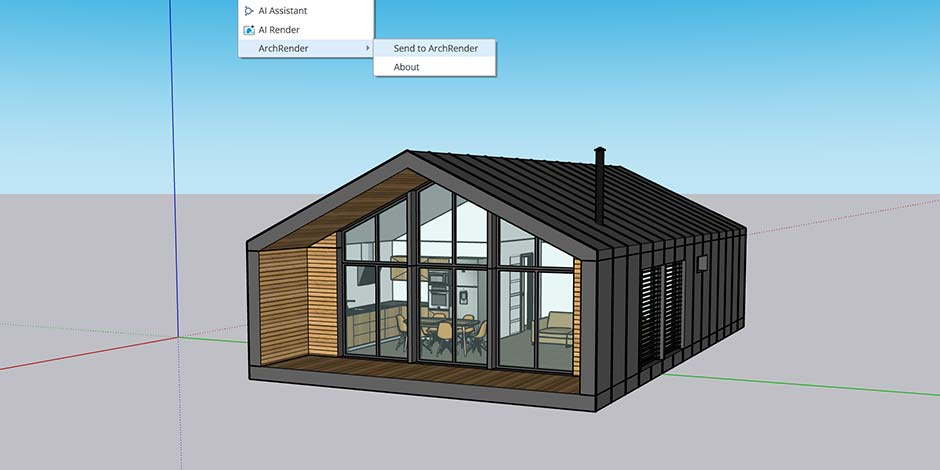
ArchRender doesn't support native SketchUp (.skp) files directly — you'll need to export to OBJ, FBX, or GLB first. For SketchUp users, this adds a step to the workflow, though export is straightforward. A SketchUp extension is in development.
Best for: Architects and design studios who work from 3D models, need consistent multi-angle renders, and want predictable monthly costs. Particularly strong for teams who collaborate on projects.
2. Vibe3D — Best for Interior Designers
Vibe3D positions itself as an AI rendering platform for interior designers, architects, and visualization specialists. Its main appeal is speed and natural language control — you can describe changes in plain English and the AI adjusts accordingly.
Key features:
Natural language editing ("make the walls warmer," "add more natural light")
Smart prompt suggestions for guided iteration
4K rendering on higher-tier plans
Cloud-based processing
Pricing:
Vibe3D uses a pay-as-you-go model based on render count. Plans scale from 100 to 1000 renders, with pricing that increases at each tier. This can work well for occasional users but may become expensive for high-volume production work.
Considerations:
Vibe3D works with images of 3D models rather than actual 3D file import. You'll upload a screenshot or exported image from your modeling software, not the model itself. This means you can't reposition the camera or render multiple angles from a single upload — each new view requires a new image upload.
The pay-per-render model also means costs are less predictable than subscription pricing. If you're iterating heavily on a project — which is normal in architectural work — the renders add up quickly.
Best for: Interior designers who work primarily from single-view images and prefer natural language controls over technical settings.
3. REimagine Home — Best for Real Estate and Virtual Staging
REimagine Home focuses on virtual staging and interior redesign rather than architectural visualization. It's designed primarily for real estate professionals who need to show potential buyers what a space could look like with different furniture and finishes.
Key features:
Virtual staging from photos of empty rooms
Style transfer and redesign options
Quick turnaround for listing photos
Considerations:
This tool solves a different problem than architectural rendering. It's excellent for showing furnished versions of existing spaces but isn't designed for visualizing new construction or architectural designs. There's no 3D model input — everything works from 2D photos.
Best for: Real estate agents, property developers, and staging companies. Not ideal for architects working on new designs.
4. Arko AI — Emerging Option for Sketch-to-Render
Arko AI is a newer entrant focused on converting architectural sketches into rendered images. It's positioned for early-stage design exploration when you're still working in 2D.
Key features:
Sketch-to-render conversion
Multiple style options
Fast iteration on concepts
Considerations:
As a newer platform, Arko has a smaller user base and less proven track record than established tools. The sketch-to-render workflow is useful for concept phases but doesn't replace 3D-based rendering for developed designs.
Best for: Architects in early concept phases who want to quickly visualize hand-drawn or digital sketches.
5. Midjourney and Stable Diffusion — Best for Concept Exploration
General-purpose AI image generators like Midjourney and Stable Diffusion have become popular for architectural concept work. They're powerful creative tools but serve a fundamentally different purpose than dedicated rendering software.
What they're good for:
Mood boards and inspiration
Early concept exploration
Stylistic experimentation
Quick visualization of abstract ideas
What they can't do:
Import 3D models
Maintain consistent geometry across views
Produce accurate representations of specific designs
Integrate with architectural workflows
These tools generate images based on text descriptions, which means they interpret and sometimes invent geometry. A "modern house with large windows" prompt might produce a beautiful image, but it won't match your actual floor plan or building massing. They're excellent for inspiration but shouldn't be used for client presentations where accuracy matters.
Pricing:
Midjourney: $10-60/month depending on tier Stable Diffusion: Free (self-hosted) or various paid platforms
Best for: Ideation, mood boards, and creative exploration. Not suitable for production rendering of specific designs.
A Note on Traditional Renderers
This guide focuses on AI-native tools, but traditional rendering software still has an important role. Tools like V-Ray, Enscape, Lumion, and D5 Render offer unmatched control for cinematic-quality final deliverables. They require more technical setup and longer render times, but they provide granular control over every aspect of the image.
If you're producing hero shots for marketing materials, competition entries, or publication-quality images, traditional renderers may still be the right choice. AI tools excel at speed and iteration; traditional tools excel at precision and maximum quality.
Many studios use both: AI tools for client communication, design development, and quick iterations; traditional renderers for final deliverables when every detail matters.
Comparison Table
Tool | 3D Import | Team Sharing | Mood Board | Pricing Model | Best For |
|---|---|---|---|---|---|
ArchRender | OBJ, FBX, GLB | ✓ | ✓ | Monthly subscription | Architects, studios, ongoing projects |
Vibe3D | (image only) | — | — | Pay-per-render | Interior designers |
REimagine Home | — | — | ✓ | Subscription | Real estate staging |
Arko AI | — | — | — | Subscription | Early concept sketches |
Midjourney | — | — | — | Subscription | Ideation and mood boards |
How to Choose the Right Tool
The right choice depends on your workflow, not feature lists. Ask yourself:
What format is your design in?
If you're working from 3D models and need accurate multi-angle renders, choose a tool with proper 3D import (ArchRender, Vibe3D). If you're in early sketch phases, tools like Arko or even Midjourney might be more appropriate.
How much will you render?
Pay-per-render pricing works for occasional use but gets expensive fast at volume. If you're rendering regularly — which most active projects require — monthly subscriptions offer better value and predictable costs.
Do you work with a team?
Solo practitioners can use any tool. Teams need shared access to projects, prompts, and render history. Most AI rendering tools are built for individual use; check for collaboration features before committing.
What's the output for?
Quick client check-ins and design development favor speed over maximum quality. AI tools are perfect here. Final marketing deliverables or competition entries may still warrant traditional rendering for absolute control.
The Bottom Line
AI rendering has matured from novelty to necessity. The tools available in 2026 can produce photorealistic results that would have required expensive render farms and specialized expertise just a few years ago.
For most architectural visualization work — client presentations, design development, planning submissions, and marketing materials — AI rendering tools are now good enough. They're not replacing traditional renderers entirely, but they're handling an increasing share of the workload because they're faster, cheaper, and easier to use.
The best choice depends on your specific workflow. If you work from 3D models and need a tool built for architectural production work with team collaboration, ArchRender is worth trying — it's free to start and designed specifically for how architects actually work.